It’s great that Phoenix comes with Heroicons support out the box, but I use Font Awesome and wanted to use those in the same way. This post will show you how you can swap out Heroicons and make a few changes so that the .icon component works with Font Awesome instead.
There are a few ways to use Font Awesome icons but this post will show you how to use the SVG icons hosted within your project in the same way that Heroicons work.
Step 1. Download the SVG files
Go to the Font Awesome download page and download the “version for the web” you’re going to use.
For this example, I’ll download the Free for Web version.
Step 2. Replace your Heroicon SVG files
-
Delete the directory
assets/vendor/heroicons
-
Create a directory
assets/vendor/fontawesome
Unzip the Font Awesome download and copy the contents of svgs/ into assets/vendor/fontawesome so you have:
assets/vendor/fontawesome/brands
assets/vendor/fontawesome/regular
assets/vendor/fontawesome/solid
If you’re using the pro version, then copy in the SVG directories you want to use.
Step 3: Modify your tailwind.config.js file
You need to update the paths from /vendor/heroicons to /vendor/fontawesome.
You need to change each icon variant, in this case we’re using regular as default, and changing -mini to -brand. You can add other Fonteawesome variants here as well, like -light.
The icon naming will change from hero-<name> to fa-<name>, hero-<name>-mini to fa-<name>-brand, and hero-<name>-solid to fa-<name>-solid.
@@ -34,12 +34,12 @@ module.exports = {
     // See your `CoreComponents.icon/1` for more information.
     //
     plugin(function({matchComponents, theme}) {
-      let iconsDir = path.join(__dirname, "./vendor/heroicons/optimized")
+      let iconsDir = path.join(__dirname, "./vendor/fontawesome")
       let values = {}
       let icons = [
-        ["", "/24/outline"],
-        ["-solid", "/24/solid"],
-        ["-mini", "/20/solid"]
+        ["", "/regular"],
+        ["-solid", "/solid"],
+        ["-brand", "/brands"]
       ]
       icons.forEach(([suffix, dir]) => {
         fs.readdirSync(path.join(iconsDir, dir)).forEach(file => {
@@ -48,12 +48,12 @@ module.exports = {
         })
       })
       matchComponents({
-        "hero": ({name, fullPath}) => {
+        "fa": ({name, fullPath}) => {
           let content = fs.readFileSync(fullPath).toString().replace(/\r?\n|\r/g, "")
           return {
-            [`--hero-${name}`]: `url('data:image/svg+xml;utf8,${content}')`,
-            "-webkit-mask": `var(--hero-${name})`,
-            "mask": `var(--hero-${name})`,
+            [`--fa-${name}`]: `url('data:image/svg+xml;utf8,${content}')`,
+            "-webkit-mask": `var(--fa-${name})`,
+            "mask": `var(--fa-${name})`,
             "mask-repeat": "no-repeat",
             "background-color": "currentColor",
             "vertical-align": "middle",
Step 4: Modify your components file.
Do a search and replace across your core_components.ex file changing “hero-“ to “fa-“. The most important change is the icon/1 function which needs to match on "fa-". Note, not all the icons have a direct replacement so you may still need to find those icons and give them names that match the Font Awesome library.
@@ -585,13 +585,13 @@ defmodule MyApp.CoreComponents do

   ## Examples

-      <.icon name="hero-x-mark-solid" />
-      <.icon name="hero-arrow-path" class="w-3 h-3 ml-1 animate-spin" />
+      <.icon name="fa-x-mark-solid" />
+      <.icon name="fa-arrow-path" class="w-3 h-3 ml-1 animate-spin" />
   """
   attr :name, :string, required: true
   attr :class, :string, default: nil

-  def icon(%{name: "hero-" <> _} = assigns) do
+  def icon(%{name: "fa-" <> _} = assigns) do
     ~H"""
     <span class={[@name, @class]} />
     """
Step 5: Use Font Awesome
You can now use any Font Awesome icons in your code with <.icon name="fa-rocket-solid" />
I hope that helps.
Step 6: Some modifications that may help
I found that to get the Font Awesome icons to work better in my project, I changed the Tailwind config a bit more.
I changed the icons to use mask-size and mask-position and then I use tailwind sizing on my icons. This change requires sizing be set for every icon, i.e. <.icon name="fa-icon" class="w-6 h-6" />
@@ -48,18 +48,18 @@ module.exports = {
         })
       })
       matchComponents({
         "fa": ({name, fullPath}) => {
           let content = fs.readFileSync(fullPath).toString().replace(/\r?\n|\r/g, "")
           return {
             [`--fa-${name}`]: `url('data:image/svg+xml;utf8,${content}')`,
             "-webkit-mask": `var(--fa-${name})`,
             "mask": `var(--fa-${name})`,
             "mask-repeat": "no-repeat",
             "background-color": "currentColor",
             "vertical-align": 'middle',
             "display": "inline-block",
-            "width": theme("spacing.5"),
-            "height": theme("spacing.5")
+            "mask-size": "contain",
+            "mask-position": "center",
           }
         }
       }, {values})
This post will show you how to add a custom tooltip component to your Phoenix project that uses the PopperJS library.
You can view all the code in a simple project on Github. See a diff from the initial install at 922ecca..30e278a
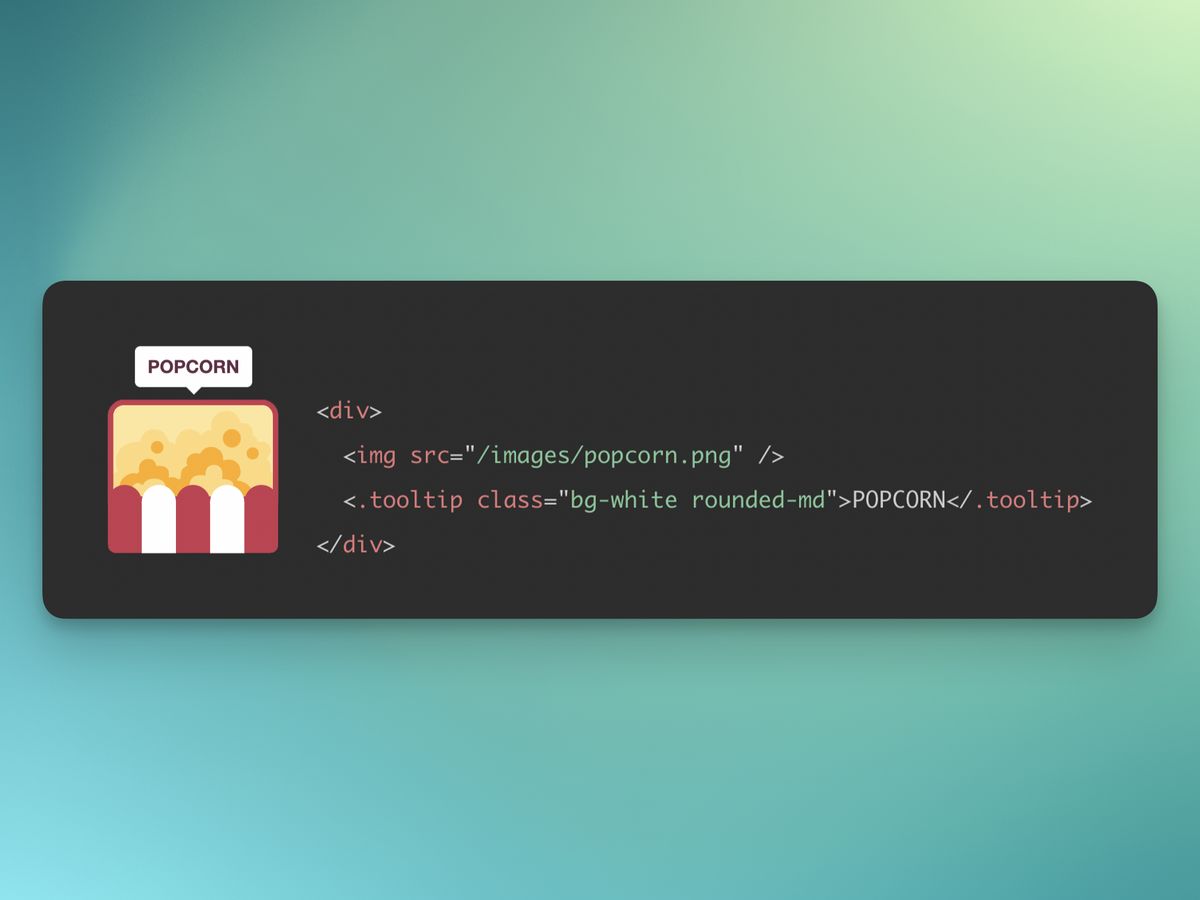
This post wil also demonstrate how to incorporate any Javascript library that requires bindings to an element. In Phoenix that is done through Hooks.
The Component
In the CoreComponents module, we have a tooltip component. I have defined a class attribute to allow style overrides, but with a defaults of nil so it’s not required
I have also defined a slot which will take the content of the tooltip. The HTML of the tooltip is just a div element. This element has the phx-hook attribute which tells Phoenix which set of hooks to bind this element with (more under Javascript).
Every element that is bound with hooks requires an id. Because we need to use tooltips easily, I have added a random ID generated through a random_id/1 function. The function takes a prefix just to help avoid collisions, even though we’re using random bytes. The end result looks like this <div id="tt_F3P5wcGhyQA"…
defmodule PhoenixTooltipsWeb.CoreComponents do
  # ...
  attr :class, :string, default: nil
  slot :inner_block, required: true

  def tooltip(assigns) do
    ~H"""
    <div id={random_id("tt")} class={["tooltip", @class]} role="tooltip" phx-hook="TooltipHook">
      <%= render_slot(@inner_block) %>
      <div class="arrow" data-popper-arrow></div>
    </div>
    """
  end

  def random_id(prefix) do
    prefix <> "_" <> (:crypto.strong_rand_bytes(8) |> Base.url_encode64(padding: false))
  end
  # ...
end
The Live View
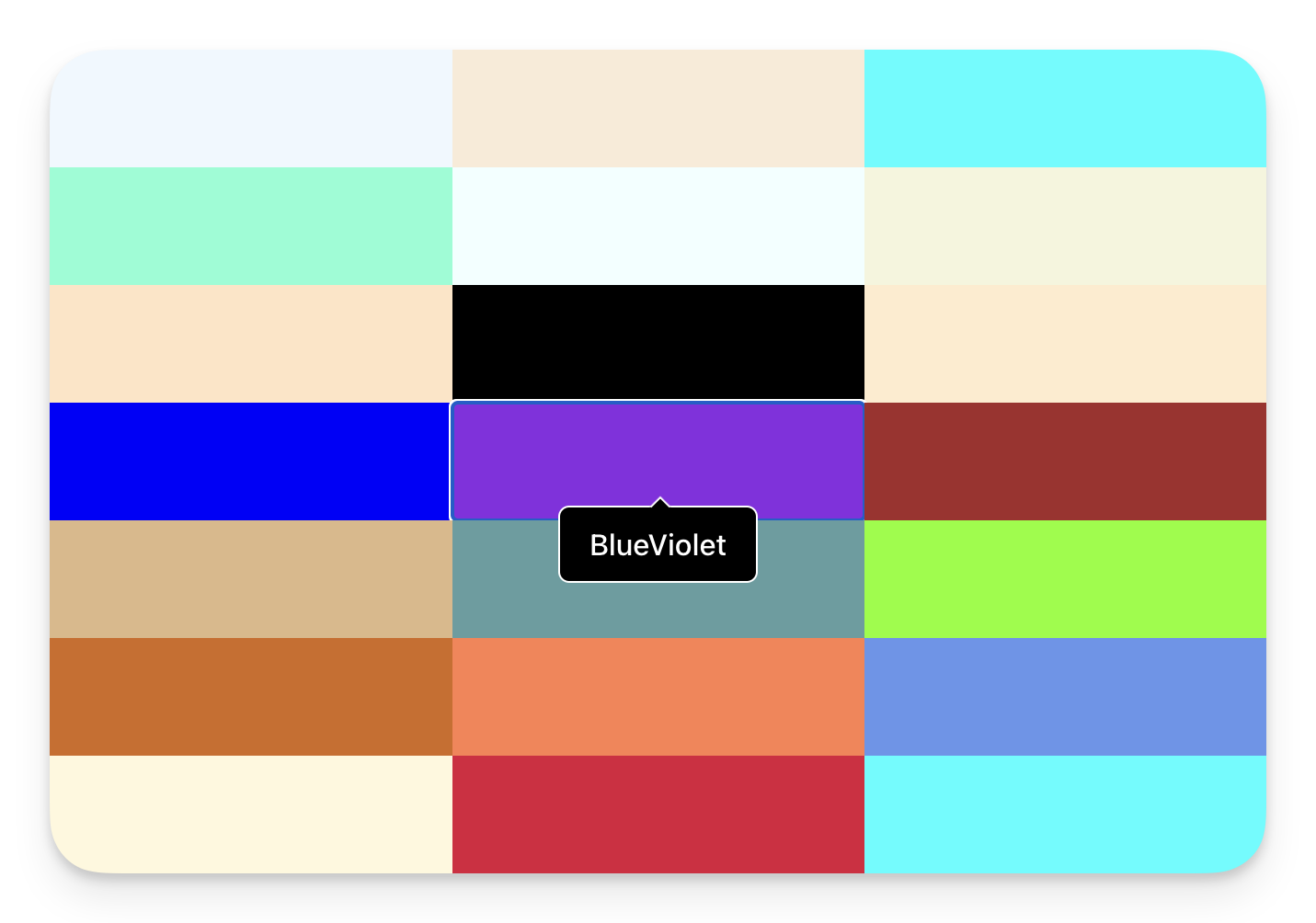
Every demonstration needs a contrived example. Here I am producing a grid of HTML colours using the HTML standard colour names. The block is a colour and the tooltip is the name of the colour.
defmodule PhoenixTooltipsWeb.PageLive do
  use PhoenixTooltipsWeb, :live_view

  def mount(_params, _session, socket) do
    {:ok, assign(socket, :color_names, color_names())}
  end

  def color_names() do
    [
      "AliceBlue",
      "AntiqueWhite",
      "Aqua",
      #...
      "BlueViolet",
      #...
      "WhiteSmoke",
      "Yellow",
      "YellowGreen"
    ]
  end
end
The Heex template iterates through all the colour names and adds a button (so you can see the tooltip on focus/blur) with the colour as the background and a tooltip with the colour name as it’s text.
<div class="grid grid-cols-1 sm:grid-cols-2 md:grid-cols-3 lg:grid-cols-4">
  <%= for color <- @color_names do %>
    <button class="h-16 rounded-none" style={"background-color:#{color}"}>
      <.tooltip class="px-4 py-2 font-medium text-white bg-black border border-white rounded-md">
        <%= color %>
      </.tooltip>
    </button>
  <% end %>
</div>
The CSS
The CSS is almost directly from the PopperJS tutorial.
The .tooltip class (included in the component by default) is initially set to display:none and then, when given the data-show attribute, is set to display:block. The rest is the styling of the arrow and it’s position.
.tooltip {
  display: none;
}

.tooltip[data-show] {
  display: block;
}

.tooltip > .arrow,
.tooltip > .arrow:before {
  position: absolute;
  width: 8px;
  height: 8px;
  background: inherit;
  border: inherit;
  border-bottom: none;
  border-right: none;
}

.tooltip > .arrow {
  visibility: hidden;
}

.tooltip > .arrow::before {
  visibility: visible;
  content: '';
  transform: rotate(45deg);
}

.tooltip[data-popper-placement^='top'] > .arrow {
  bottom: -5.5px;
}

.tooltip[data-popper-placement^='bottom'] > .arrow {
  top: -5.5px;
}

.tooltip[data-popper-placement^='left'] > .arrow {
  right: -5.5px;
}

.tooltip[data-popper-placement^='right'] > .arrow {
  left: -5.5px;
}
The Javascript
The first step is to install the PopperJS library via npm. the --prefix assets is needed to place the node related files in the assets/ directory.
$ npm install @popperjs/core --prefix assets
I have created a Tooltip javascript class to manage the lifescycle of the tooltip. This can be pasted into the top of your app.js file or in it’s own file and imported into app.js
The constructor sets up the tooltip by creating a popperInstance, linking the tooltip element to it’s parent, and setting event listeners on the parent to show/hide the tooltip. For this example we are using mouseenter and focus to show the tooltip and mouseleave and blur to hide it. The class also stores destructors so that event lsiteners are removed when the tooltip is removed from the DOM (preventing possible memory leaks).
import { createPopper } from '@popperjs/core';

// A class to manage the tooltip lifecycle.
class Tooltip {
  showEvents = ['mouseenter', 'focus'];
  hideEvents = ['mouseleave', 'blur'];
  $parent;
  $tooltip;
  popperInstance;

  constructor($tooltip) {
    this.$tooltip = $tooltip;
    this.$parent = $tooltip.parentElement;
    this.popperInstance = createPopper(this.$parent, $tooltip, {
      modifiers: [
        {
          name: 'offset',
          options: {
            offset: [0, -8],
          },
        },
      ],
    });
    this.destructors = [];

    // For each show event, add an event listener on the parent element
    //   and store a destructor to call removeEventListener
    //   when the tooltip is destroyed.
    this.showEvents.forEach((event) => {
      const callback = this.show.bind(this);
      this.$parent.addEventListener(event, callback);
      this.destructors.push(() =>
        this.$parent.removeEventListener(event, callback)
      );
    });

    // For each hide event, add an event listener on the parent element
    //   and store a destructor to call removeEventListener
    //   when the tooltip is destroyed.
    this.hideEvents.forEach((event) => {
      const callback = this.hide.bind(this);
      this.$parent.addEventListener(event, callback);
      this.destructors.push(() =>
        this.$parent.removeEventListener(event, callback)
      );
    });
  }

  // The show method adds the data-show attribute to the tooltip element,
  //   which makes it visible (see CSS).
  show() {
    this.$tooltip.setAttribute('data-show', '');
    this.update();
  }

  // Update the popper instance so the tooltip position is recalculated.
  update() {
    this.popperInstance?.update();
  }

  // The hide method removes the data-show attribute from the tooltip element,
  //   which makes it invisible (see CSS).
  hide() {
    this.$tooltip.removeAttribute('data-show');
  }

  // The destroy method removes all event listeners
  //   and destroys the popper instance.
  destroy() {
    this.destructors.forEach((destructor) => destructor());
    this.popperInstance?.destroy();
  }
}
Phoenix Hooks are where the magic happens.
Our TooltipHook listens for three of the six possible lifecycle hooks.
-
mounted is called when the tooltip has been added to the DOM and this is where we instantiate an instance of our Tooltip class and link it to the element. (this.el is made available by Phoenix).
-
updated is called if the element is updated by Phoenix and we simply pass on that message.
-
destroyed is called when the element is removed from the DOM and we in turn call destroy on the Tooltip object so that the event listeners are removed.
Important: You need to update the let liveSocket = … line in app.js and add , hooks: Hooks which is not there by default.
// ...
const Hooks = {
  TooltipHook: {
    mounted() {
      this.el.tooltip = new Tooltip(this.el);
    },
    updated() {
      this.el.tooltip?.update();
    },
    destroyed() {
      this.el.tooltip?.destroy();
    },
  },
};

// ...
let liveSocket = new LiveSocket('/live', Socket, {
  params: { _csrf_token: csrfToken },
  // add the Hooks object
  hooks: Hooks,
});
// ...
By using Phoenix Client hooks we are able to connect the element of a component to a Javascript client library, add event listeners, and provide custom interaction.
See all the code on Github.
Elixir has some useful utility functions available in iex like h/1 which prints documentation on the given module or function/arity pair.
You can add your own utility functions or macros by defining a utility module and then importing it into your .iex file.
Example
defmodule MyApp.IexUtilities do
  def u(id_or_username) do
    MyApp.Users.find_user(id_or_username)
  end
end
Import your utility module in your .iex file in the project root
# .iex
import MyApp.IexUtilities
and the function is available in your iex session
iex> user = u "demo"
%MyApp.User{id: 42, username: "demo", name: "John Doe"}
Macros
You can take this a bit further and automatically assign it to a variable within the iex session by using a macro and an unhygienic variable. The variable defined with var!/1 will bleed out to the outer scope meaning you can type u "username" and have the result automaitcally added to a variable, in this case user;
defmodule MyApp.IexUtilities do
  defmacro u(id_or_username) do
    var!(user) = MyApp.Users.find_user(unquote(id_or_username))
  end
end
and now in your iex session you can easily lookup a user to work with.
iex> u "demo"
%MyApp.User{id: 42, username: "demo", name: "John Doe"}
iex> user
%MyApp.User{id: 42, username: "demo", name: "John Doe"}
I had a GenServer that I wanted to change the state of during a hot upgrade release, so I dutifully reached for code_change/3 as per the documentation, but no matter how hard I tried, I couldn’t get it to work.
I read and re-read all the documentation I could find on releases and hot upgrades and tried and tried again but my callback was never called.
I quite like Dave Thomas’ method of splitting the API from the server implementation so my code looked something like this:
defmodule MyStore do
  def child_spec(opts) do
    %{
      id: MyStore.Server,
      start: {MyStore, :start_link, [opts]},
      type: :worker,
      restart: :permanent,
      shutdown: 500
    }
  end

  def start_link(args \\ nil, opts \\ []) do
    GenServer.start_link(MyStore.Server, args, opts)
  end

  def put(pid, key, value) do
    GenServer.call(pid, {:put, key, value})
  end

  def get(pid, key) do
    GenServer.call(pid, {:get, key})
  end

  defmodule Server do
    use GenServer
    require Logger

    @impl true
    def init(_opts) do
      {:ok, []}
    end

    @impl true
    def handle_call({:put, key, value}, _from, server_state) do
      server_state = [{key, value} | server_state]
      {:reply, :ok, server_state}
    end

    def handle_call({:get, key}, _from, server_state) do
      {:reply, Keyword.get(server_state, key), server_state}
    end

    @vsn "1"
    @impl true
    def code_change(from_vsn, server_state, _extra) do
      Logger.info("code_change from: #{inspect(from_vsn)}")
      {:ok, server_state}
    end
  end
end
A very simple and contrived example of a store running on a GenServer with the obvious flaw that it’s implemented as a keyword list instead of the more obvious map. So the idea is to change the state via a hot upgrade.
Adding the following code_change/3 code before the original implementation should do the trick—along with updating the server API to use the map.
  defmodule Server do
    use GenServer
    require Logger

    @impl true
    def init(_opts) do
      {:ok, %{}}
    end

    @impl true
    def handle_call({:put, key, value}, _from, server_state) do
      server_state = Map.put(server_state, key, value)
      {:reply, :ok, server_state}
    end

    def handle_call({:get, key}, _from, server_state) do
      {:reply, Map.get(server_state, key), server_state}
    end

    @vsn "2"
    @impl true
    # Ignoring downgrading for this example
    def code_change("1", server_state, _extra) do
      Logger.info("code_change from: #{inspect(server_state)}")
      {:ok, Map.new(server_state)}
    end

    def code_change(from_vsn, server_state, _extra) do
      Logger.info("code_change from: #{inspect(from_vsn)}")
      {:ok, server_state}
    end
  end
All good. So have you found out what’s wrong yet? Neither had I.
So far as I can tell, there is nothing wrong with my code. The problem isn‘t even visible here, it becomes apparent when you look at the supervisor and how Erlang finds the processes it’s going to run code_change/3 against.
During an application upgrade, the Release handler works through the supervision tree and pauses processes that need updating. It then runs the code_change/3 function on the module for each process and then unpauses the processes and finalises the release.
The appup file for the example above would look something like this:
{"2",
 [{"1", [{update, 'Elixir.MyStore.Server', {advanced, []}}]}],
 [{"1", [{update, 'Elixir.MyStore.Server', {advanced, []}}]}]
}.
That looks fine. We want the upgrade to run MyStore.Server.code_change/3.
When the map is started under a dynamic supervisor, the response from which_children/1 is
[{:undefined, #PID<0.161.0>, :worker, [MyStore]}]
This is the same result that Erlang gets when it retrieves all supervised processes in get_supervised_procs/0 which is ”…the magic function. It finds all process in the system and which modules they execute as a call_back or process module.”
{:undefined, #PID<0.161.0>, :worker, [MyStore]} is included in the results of :release_handler_1.get_supervised_procs() (which I was super happy to find was an exported function—thank you Erlang) and there we have the problem—==Erlang thinks that MyStore is the module that is being executed as the call_back or process module, not MyStore.Server==
Because MyStore is not listed as changing in the appup file, no code_change/3 is called on it, and because MyStore.Server isn’t listed as a module of a running process, code_change/3 isn’t called on that module either and so the process is left, state unchanged, and the next call to the process will have the incorrect state and the process will crash 💣.
After a lot of code spelunking I have identified the problem and the solution is quite a simple change: move start_link/3 into MyStore.Server and update the child_spec accordingly.
defmodule MyStore do
  def child_spec(opts) do
    %{
      id: MyStore.Server,
      start: {MyStore.Server, :start_link, [opts]},
      type: :worker,
      restart: :permanent,
      shutdown: 500
    }
  end

  #...

  defmodule Server do
    use GenServer
    require Logger

    def start_link(args \\ nil, opts \\ []) do
      GenServer.start_link(Server, args, opts)
    end

    #...
  end
end
Now the output of :release_handler_1.get_supervised_procs() looks like this:
[#...
{:undefined, #PID<0.161.0>, :worker, [MyStore.Server]}]
and code_change/3 is correctly called 🎉.
I always appreciate gaining a deeper understanding of how the underlying toolset of a system works and I hope that when you are searching for “why code_change isn’t called on my GenServer” you’ll get this helpful result ;-)
Having just started using HEY, I have been forced to screen and process all my email—which is a good thing.
This has helped me to unsubscribe from a lot of newsletters I was ignoring anyway.
But what has been striking to me is the number of no-reply@… addresses many emails come from.
I wonder why these exist?
Why not send all emails from an email address that you can reply to?
If I receive an order, I might want to query something—but now I have to find some way to contact them.
If I receive some notification to do something, but it’s not clear—I have to find support instead of replying to the email.
I can’t think if a single situation (even an alert notification—which is what I’m busy working on) where it is not extremely helpful to be able to reply and ask a person. Not to mention that the email I’m replying to probably helps in providing some of the context for my question.
Because of this, in Sitesure, every email will have a reply path that goes back to a person who can help—even the alert notifications.
A big shout out to BEE who send their emails from:
The BEE Team ‹yes-reply@beefree.io› 😁
”You keep using that word. I do not think it means what you think it means.”
Words matter.
Just because we’re using the same words doesn’t mean we understand each other.
Semantics are important.
If we agree on the meanings behind the words, then using the right words helps our understanding.
I wonder if products would be more user friendly if the CEO of the company had to demonstrate its use?
When I struggle to open something or this thing doesn’t quite fit into that then it’s obvious that corners have been cut in the name of profits.
This is where small businesses have the opportunity to shine. The owner is directly connected to the customer.
I guess that was part of the wow factor of Apple. Steve Jobs did demonstrate his products and you could see how he cared about the details (and it didn’t hurt their profits.)
This is something I need to revisit again and again.
I put something on my todo list and lie to myself that it is important enough that I’ll do it today. But in the back of my mind, deep down in the recesses of my psyche, I know I’m not going to do it. I don’t really want to do it.
This wastes mental energy as I revisit the need to complete the task. It also builds up a sense of guilt as undone tasks roll over day after day.
How much easier life would be if I was honest about what is really important and what I’m really going to commit to do. Then I could work with a clear mind and give those things I actually plan to do the focus they need.
Phoenix 1.4 is on it’s way
and one of the big changes is that webpack
is replacing brunch. If you are a
SASS
fan then this is how to update the default Webpack configuration to use SASS (SCSS flavour).
Install NPM packages
The first step is to install the node-sass
and sass-loader
packages from NPM.
Using Yarn
$ yarn add node-sass sass-loader --dev
Using NPM
$ npm install node-sass sass-loader --save-dev
Update webpack.config.js
Update the assets/webpack.config.js
file with a change to chain the sass-loader
plugin after the css-loader.
diff --git a/assets/webpack.config.js b/assets/webpack.config.js
index 5225785..4c14948 100644
--- a/assets/webpack.config.js
+++ b/assets/webpack.config.js
@@ -26,8 +26,18 @@ module.exports = (env, options) => ({
         }
       },
       {
-      test: /\.css$/,
-      use: [MiniCssExtractPlugin.loader, 'css-loader']
+      test: /\.scss$/,
+      use: [
+        MiniCssExtractPlugin.loader,
+        {
+          loader: 'css-loader',
+          options: {}
+        },
+        {
+          loader: 'sass-loader',
+          options: {}
+        }
+      ]
       }
     ]
   },
Update app.css
Rename your assets/css/app.css
to assets/css/app.scss.
$ mv assets/css/app.css assets/css/app.scss
Update app.js
Because the CSS files are loaded by Webpack through the javascript file, you need to update the css import path as well.
diff --git a/assets/js/app.js b/assets/js/app.js
index 8ee7177..0aa55a0 100644
--- a/assets/js/app.js
+++ b/assets/js/app.js
@@ -1,7 +1,7 @@
 // We need to import the CSS so that webpack will load it.
 // The MiniCssExtractPlugin is used to separate it out into
 // its own CSS file.
-import css from "../css/app.css"
+import css from "../css/app.scss"

 // webpack automatically bundles all modules in your
 // entry points. Those entry points can be configured
Build assets
Finally test your assets build.
$ node node_modules/webpack/bin/webpack.js --mode development
With Phoenix 1.4 announced at ElixirConf EU (https://youtu.be/MTT1Jl4Fs-E) I was keen to try it out. I was specifically interested in seeing the new Webpack integration.
Getting started with Phoenix 1.4 is really quite easy.
Uninstall the existing Phoenix 1.3 archive
From the README,
Remove any previously installed phx_new
archives so that Mix will pick up the local source code. This can be done with
mix archive.uninstall phx_new
or by simply deleting the file, which is usually in ~/.mix/archives/.
Clone the Phoenix master repo
$ git clone https://github.com/phoenixframework/phoenix
Build and install the Phoenix archive
$ cd phoenix/installer
$ MIX_ENV=prod mix do archive.build, archive.install
Generate your new Phoenix 1.4 app
Run mix phx.new my_app
Your mix.exs deps will now look like this:
defp deps do
  [
    {:phoenix, github: "phoenixframework/phoenix", override: true},
    #…
  ]
end
When Phoenix 1.4 is released, you can just update this line to:
defp deps do
  [
    {:phoenix, "~> 1.4.0"},
    #…
  ]
end
Revert back to the Phoenix 1.3 installer
Reverting to the 1.3 installer is as easy as uninstalling and reinstalling the Phoenix archive.
Related
mix archive.uninstall phx_new-1.3.0
mix archive.install https://github.com/phoenixframework/archives/raw/master/phx_new.ez
Next page